Guides · Account & plans
Upgrade, pay yearly and cancel
Updated 11/02/2026 · screenshots from app version 0.6.5
This article helps you upgrade your plan, choose monthly or yearly billing, switch plans and cancel.
Pricing
Basic $19, Pro $69, Unlimited $139 per month for sign-ups through 11/09/2026 (Vietnam time), price locked until you cancel. Signing up after that: Basic $29, Pro $79, Unlimited $149 per month. Annual billing: get 12 months, pay for 10.
The price depends on the day you created your account, not the day you paid. If you create an account during the special price period and pay after your trial ends, you still get that price. The price stays the same until you cancel. All prices are in USD.
Upgrade
- Click your account name and choose “Upgrade plan”. Or open Settings, “Plan and billing”.
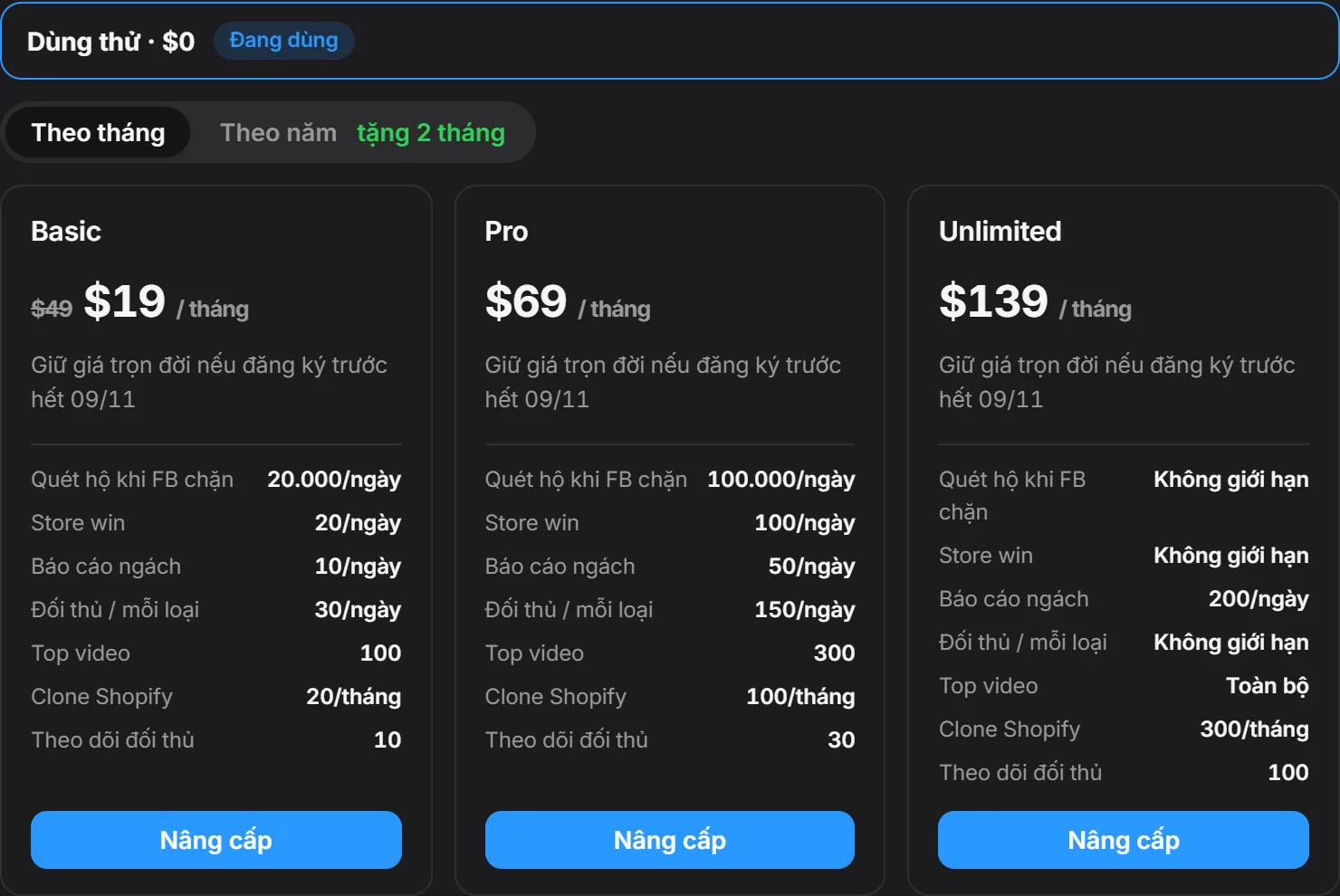
- Choose “Monthly” or “Yearly”.
- Click “Upgrade” on the plan you want.
- The Stripe payment page opens. Pay with Visa, Mastercard, JCB, Amex, Apple Pay or Google Pay.
- After you pay, come back to the app. Your plan shows the “Current” label.
After the 7-day trial ends, the app stops scanning and does not charge you automatically. Open the app and you will see the plan selection screen to pay.
Yearly billing
Yearly billing charges for 10 months and gives you 12 months of use. When you choose “Yearly”, each plan also shows its price converted to a monthly figure. The yearly price also depends on your account creation date, just like the monthly price.
Switch plans
- Open Settings, “Plan and billing”.
- On the plan you want to switch to, click “Switch to this plan”. The Stripe management page opens.
- Choose the new plan and billing period (monthly or yearly), then confirm.
- Upgrading to a higher plan, or switching from monthly to yearly: takes effect immediately, and Stripe charges the difference right away.
- Downgrading to a lower plan, or switching from yearly to monthly: takes effect at the end of the period you have paid for. You use your current plan until the end of the period, with no refund for the remainder.
Each account can only have one active plan. If you already have a plan, switch through the management page and don’t buy a second plan.
Cancel your plan
- Open Settings, “Plan and billing”.
- On the “Card, invoices, billing details, cancellation” row, click “Open billing portal”.
- On the Stripe page, choose cancel plan.
You can cancel at any time, and you keep using the plan until the end of the period you paid for. This management page is also used to change your card and view invoices. SpyWinAds does not store your card number.
Related articles
Thank you.