Guides · How it works
What is Deep dive
Updated 11/02/2026 · screenshots from app version 0.6.5
This article helps you understand the Deep dive step and why the numbers of a video that has not been dug deeper tell you nothing yet.
Why a deep dive is needed
Keyword scanning only sees ads that contain the exact words you typed. A video may be running at many other shops, with different ad text.
So the shop and ad counts you see right after a scan are only what happened to turn up. A video that looks like “1 shop, a few ads” may actually be run by many shops.
Deep dive is a required step before a video goes into the Potential videos, Winning videos, Scaling videos and Evergreen products tabs.
What a deep dive does
The app looks up the video’s ad text again on the Ad Library. The results reveal other Fanpages and shops running the same video, including earlier postings.
If an earlier posting is found, the video’s age may increase. After the dig, the video is considered for a tab using the real numbers.
Which videos get dug
- Video age no more than 30 days.
- Total ads Old + Win + Scale above 20.
- Has a sales link.
A video that is already in a tab only gets its numbers refreshed daily, and is not dug again.
Reading the Deep dive tab
- Open the Deep dive tab in the left sidebar, in the Collect group.
- Look at the 3 number boxes at the top: videos awaiting dig, videos being dug, videos that went into a tab after the dig.
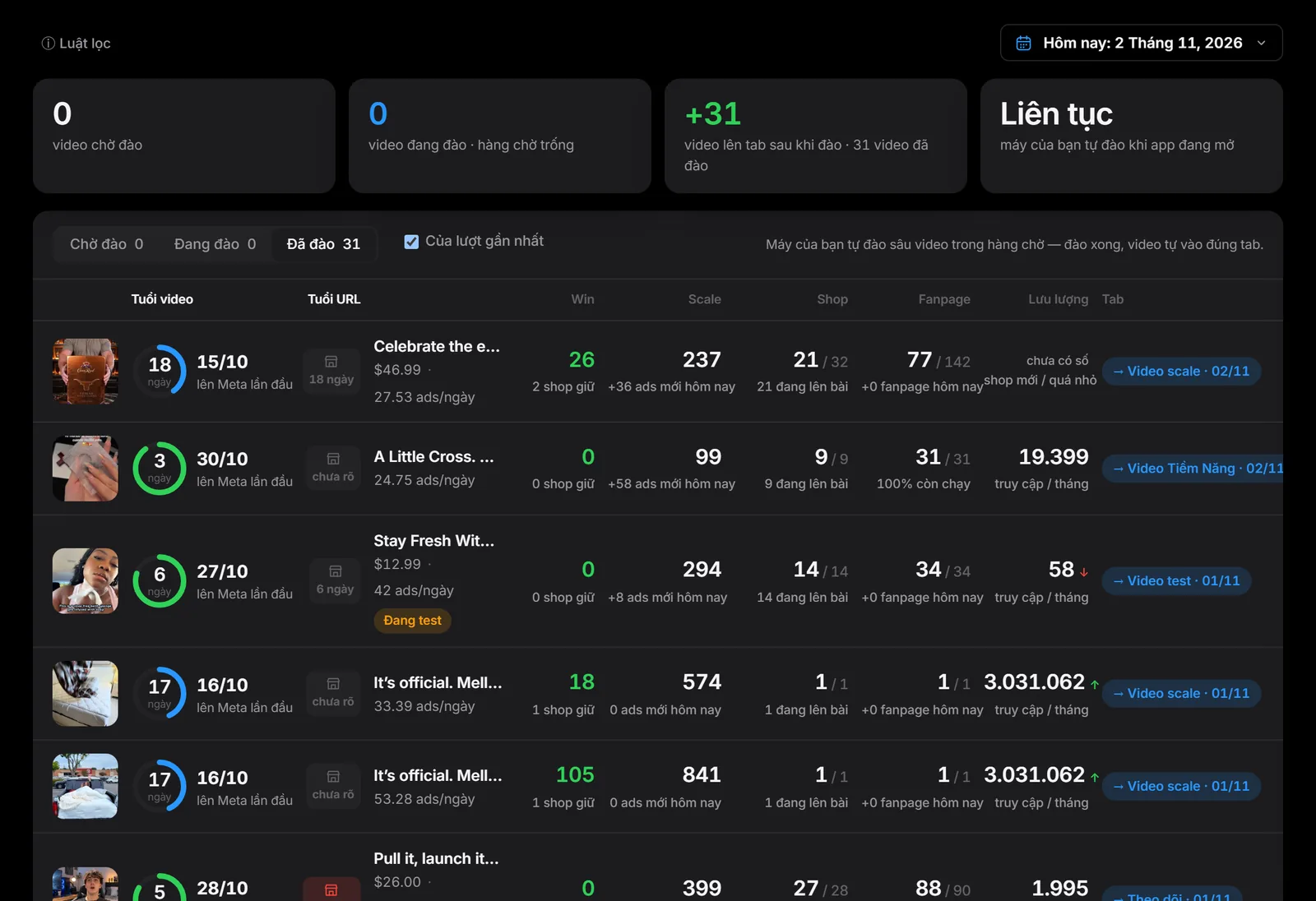
- Choose Awaiting dig, Digging or Dug to filter the list. Tick From the latest run to see only videos from the most recent scan.
- Read the label at the end of each row: “Awaiting dig”, “Digging”, “→ tab name” (dug and already in that tab), “Not in a tab yet” (dug but doesn’t meet any tab’s rules yet).
Related articles
- How SpyWinAds divides Win, Scale and Old
- The video's true age
- Scanning on your home network
- Daily product research routine
Thank you.